🔒 New Feature: Securely Manage "Secrets" in Integrations
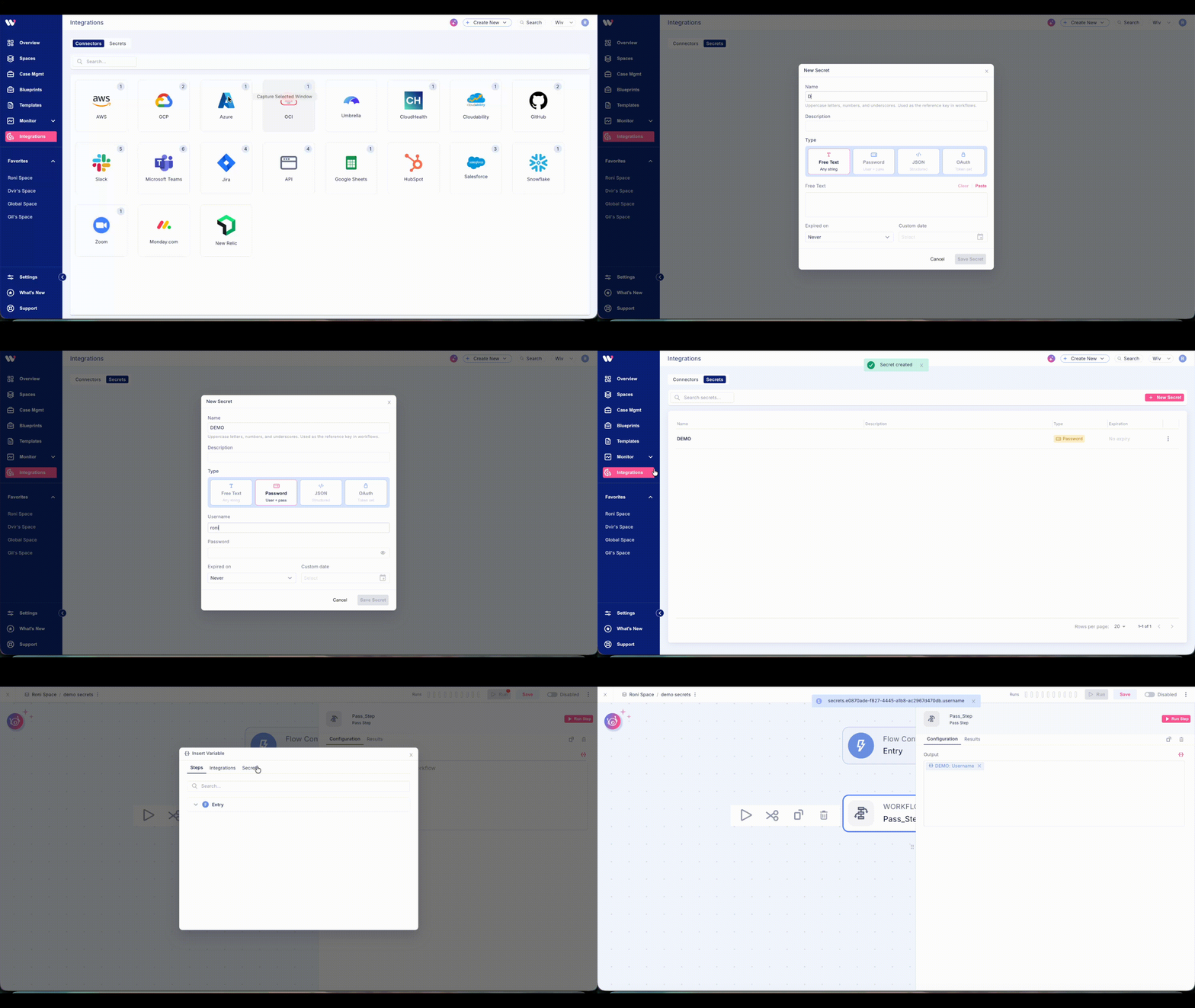
We are excited to introduce Secrets - now available right inside your Integrations!
You can now securely store and encrypt sensitive credentials to power custom, unsupported integrations or inject confidential data safely into your workflows.
What’s Included?
Click + New Secret to create and manage four flexible data types:
Free Text: For API keys and custom strings.
Password: For traditional username/password pairs.
JSON: For structured configuration data.
OAuth: For managing access and refresh tokens.
You can also set custom expiration dates to keep your security rotation strict and compliant.
How to Use Secrets in Your Workflow
Using your saved secrets inside a workflow is incredibly simple:
While building your workflow, click the var (variable) icon.
Select the new Secrets option from the dropdown menu.
Choose the relevant secret, and it will be safely injected into your process.
How to Get Started
Go to Integrations ➔ Secrets tab ➔ Click + New Secret. Once saved, your encrypted credentials are ready for action.
Keep your workflows powerful, flexible, and fully encrypted!